WhatsApp Flows: How to Build Interactive Forms, Lead Capture & Booking (2026)
WhatsApp Flows turn a chat into a mini app — customers book appointments, submit leads and complete forms without ever leaving WhatsApp, and completion rates beat web forms several times over. This 2026 guide explains what Flows are, how they work, the best use cases, and how to build one with no code.

On this page
You send a customer a link to book an appointment or fill a form — and most of them never finish. They tap out to a browser, the page loads slowly, there's a login wall, and around 60% bail before submitting. WhatsApp Flows fix exactly that: a native, interactive form that opens inside the chat, so customers complete the whole task without ever leaving WhatsApp. Here's what they are, why they convert so much better, and how to build one.
What are WhatsApp Flows?
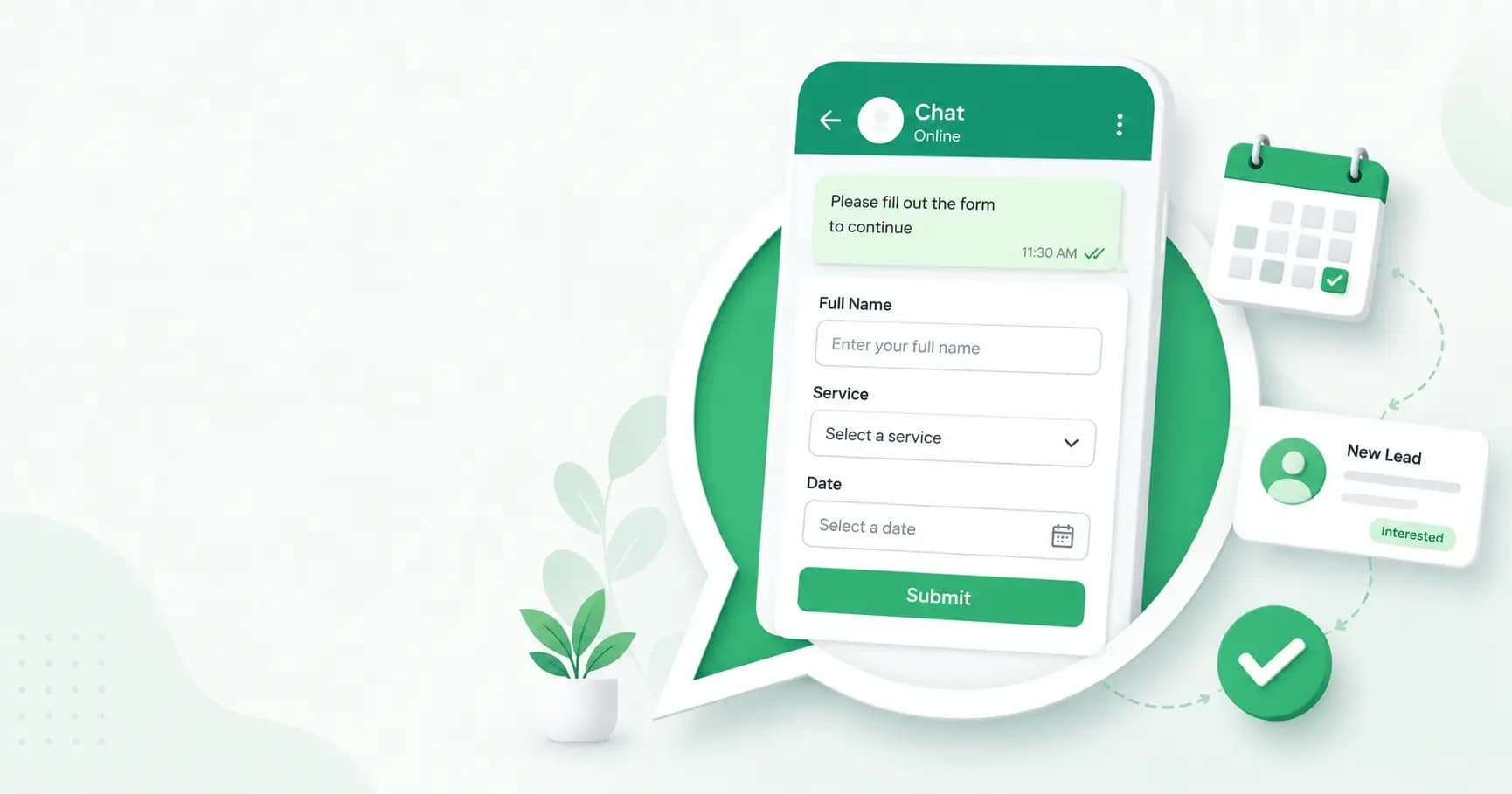
WhatsApp Flows are structured, interactive experiences — essentially native forms — that run inside a WhatsApp conversation. Instead of a long back-and-forth or a link to an external form, a business sends a single button that opens a full-screen experience with one or more screens, each containing form components: text inputs, dropdowns, radio buttons, checkboxes, date pickers, and even image uploads.
Customers use them to complete an entire task — book an appointment, place an order, register for an event, submit a lead, sign up — without ever leaving WhatsApp. Think of a Flow as a mini app delivered inside a chat bubble. Introduced in 2023 and matured through 2026, it's the biggest usability leap for WhatsApp Business in years.
Why Flows convert better than web forms
This is the whole point of Flows — they remove the friction that kills form completion:
- No redirect. The customer never leaves WhatsApp — no browser load, no login wall, no cold landing page.
- Pre-filled identity. WhatsApp already knows their name and number, so there's less to type.
- Fast completion. Most Flows are finished in 18–60 seconds, versus 2–5 minutes for an equivalent web form.
- Clean, structured data. Answers come back in fixed fields, ready to drop straight into your CRM.
The results speak for themselves: businesses consistently report 2–5× higher completion rates on in-chat Flows than on equivalent web or email forms, with form abandonment dropping from around 60–70% on web to just 15–30% on WhatsApp. Some report lead-completion increases of up to 300% after switching. In Brazil, Banco Mercantil turned WhatsApp into a primary lead channel, with 51% of people who started a chat going on to acquire a credit product.
Flow vs chatbot vs web form
These get confused, but they solve different problems:
- A web form lives outside WhatsApp — it loads, distracts, and loses people to cross-app friction.
- A [chatbot](https://splashifypro.com/blog/how-to-build-a-whatsapp-chatbot) holds an open-ended conversation and interprets free text — flexible, but the data it returns is unpredictable.
- A Flow is a structured form with fixed screens and input types, so every completion returns the same clean data fields — deterministic and reliable.
Many businesses use both: a Flow to capture structured data (qualification, booking), then a chatbot or human for open-ended follow-up.
WhatsApp Flows use cases
Almost any task that would otherwise need a web form or a long chat is a good Flow:
- Lead capture & qualification — collect name, budget, timeline and requirements in a structured form that scores and routes the lead.
- Appointment booking — service → date → time slot → confirm, used by clinics, salons, consultants and real estate for [site visits](https://splashifypro.com/blog/whatsapp-for-real-estate).
- Event registration — sign up and get instant confirmation.
- Order & checkout — browse products, pick variants, capture the delivery address, and confirm.
- Sign-up / subscription — convert Click-to-WhatsApp ad traffic into subscribers with no landing page.
- Surveys & feedback — NPS and open feedback, with far higher response rates than email.
- Support intake — order number, issue category, photo upload — creating a ticket in seconds.
- Returns & exchanges — replace a help-desk form and cut first-response time dramatically.
- Onboarding & KYC — guided, form-based sign-up and verification.
What you need to use WhatsApp Flows
The most important requirement: Flows only work on the WhatsApp Business API (Cloud API) — they are not available in the free WhatsApp Business app. You'll need:
- A [WhatsApp Business API](https://splashifypro.com/blog/whatsapp-business-api-guide) account connected to Meta Business Manager (via a provider).
- A Flow builder — either Meta's Flow Builder, or a no-code visual builder from your platform.
- Meta approval — both the Flow and the template that opens it need approval (usually 1–3 days).
Static vs dynamic Flows
There are two kinds:
- Static Flows (Meta calls them "endpoint-less") collect answers and deliver them all when the form is submitted. These cover almost every lead-generation and booking use case, and they need no code.
- Dynamic Flows connect to a developer-built endpoint for live data — like showing real, up-to-the-minute appointment slots or running a calculator. These need some development work.
For most businesses, static Flows are all you need.
How to build a WhatsApp Flow, step by step
1. Open the Flow Builder — in WhatsApp Manager (Account tools → Flows → Create Flow), or use your platform's visual drag-and-drop builder.
2. Start from a template — Meta ships lead-generation, sign-up and appointment-booking templates. Pick the closest one rather than starting blank.
3. Design your screens — add components (text inputs, dropdowns, radio buttons, date pickers). Keep it to 2–4 screens and 4–6 questions — every extra field costs completions. Lead with the highest-signal question (budget, service type or location).
4. Use structured inputs — dropdowns, radio buttons and date pickers beat free text: faster for the customer, cleaner for your CRM.
5. Preview and test — send a test Flow to your own number before publishing.
6. Publish the Flow and wait for Meta approval.
7. Attach it to a template — create a message template with an "Open Flow" button pointing to your Flow.
8. Trigger it — send it as a broadcast, fire it from an automation (a keyword, an ad click, a support reply), or use it as the qualification layer for your [Click-to-WhatsApp ads](https://splashifypro.com/blog/click-to-whatsapp-ads-guide).
9. Route the data — completed responses come back as structured data that flows straight into your CRM, shared inbox or workflow.
(If you're technical, Flows are defined in Flow JSON — but a good no-code builder generates all of that for you.)
Best practices
- Keep it short. Fewer screens and fields means higher completion — ask only what you need.
- Use structured inputs everywhere you can, for clean data.
- Lead with the qualifying question that does the most work.
- Test before you publish, so nothing breaks for a real customer.
- Route data to your CRM and follow up with personalisation — reference exactly what they entered ("You mentioned a budget of X — here's a plan that fits").
- Get explicit opt-in and use compliant software to protect your account.
How Splashify Pro's Flow Builder works
Building Flows by hand means writing JSON and wiring up webhooks. [Splashify Pro](https://splashifypro.com/products/whatsapp-flows-builder) removes all of that with a visual, no-code Flow Builder — you configure screens, fields and logic by dragging and dropping, and it generates the Flow, handles Meta's API and approval, receives the submitted data, and routes it straight into your CRM or [shared inbox](https://splashifypro.com/blog/whatsapp-shared-team-inbox-guide). You can trigger Flows from automations, attach them to broadcasts, or use them to qualify Click-to-WhatsApp ad leads — turning WhatsApp into a high-converting, form-free funnel.
Frequently asked questions
What are WhatsApp Flows?
WhatsApp Flows are native, interactive forms that run inside a WhatsApp chat. A business sends a button that opens a full-screen, multi-screen form with inputs, dropdowns and date pickers, letting customers book appointments, capture leads, place orders or sign up without leaving WhatsApp.
Do WhatsApp Flows work on the free WhatsApp Business app?
No. Flows are only available through the WhatsApp Business API (Cloud API), not the free WhatsApp Business app. You need API access via a provider and a connected Meta Business Manager.
Do I need to know coding to build a WhatsApp Flow?
Not for most use cases. Static Flows (lead capture, booking, sign-up) can be built with no code using a visual Flow Builder or Meta's templates. Only advanced dynamic Flows — like live appointment availability — need developer work.
Why do WhatsApp Flows convert better than web forms?
Because the customer never leaves WhatsApp — there's no browser redirect, login wall or slow landing page, and their identity is pre-filled. This removes the friction that causes around 60% of web-form users to drop off, so in-chat Flows typically see 2–5× higher completion rates.
What can I use WhatsApp Flows for?
Common use cases include lead capture and qualification, appointment booking, event registration, order and checkout, sign-ups, surveys and feedback, support intake, returns requests, and onboarding or KYC — anything that would otherwise need a form or a long chat.
How do I collect the data from a WhatsApp Flow?
When a customer submits a Flow, the responses are delivered back to your business as structured data (via webhook), which can be routed automatically into your CRM, shared inbox, email platform or spreadsheet. A platform like Splashify Pro handles this routing for you.
Can I collect payments inside a WhatsApp Flow?
In supported regions, you can integrate payment gateways to collect payments within the chat, making a Flow a complete end-to-end experience from selection to checkout — no external page needed.
How do I trigger a WhatsApp Flow?
You attach the Flow to a message template with an "Open Flow" button, then send it as a broadcast, trigger it from an automation (a keyword, an ad click, or a support reply), or use it to qualify Click-to-WhatsApp ad leads.
The bottom line
WhatsApp Flows turn a conversation into an action — booking, buying, signing up — without the friction of a web form. They keep customers in the app they trust, return clean data to your systems, and consistently convert several times better than landing pages. If you're running ads, capturing leads, or booking appointments on WhatsApp, Flows are the missing piece that turns chats into completed outcomes.
[Build no-code WhatsApp Flows with Splashify Pro →](https://app.splashifypro.com/auth/signup) — visual Flow Builder, CRM routing, and automation triggers built in. Start free for 14 days.
Related posts
More articles you might find useful.
AI Agents for WhatsApp: How AI Is Transforming Business Messaging in 2026
In 2026, AI agents are replacing rule-based chatbots on WhatsApp — understanding intent, remembering context, and taking real actions like booking appointments and closing sales. This guide explains what a WhatsApp AI agent is, how it differs from a chatbot, what it can do, and why 2026 is the turning point.
How to Build a WhatsApp Chatbot in 2026 (No-Code Guide)
A WhatsApp chatbot answers customers, qualifies leads and takes orders 24/7. This 2026 no-code guide explains rule-based vs AI chatbots, walks through building one step by step, covers Meta's new AI chatbot rules, and shares the best use cases.
Instagram Automation & Instagram Chatbots: A Complete Guide (2026)
Instagram automation lets you auto-reply to DMs and comments, capture leads, and run an Instagram chatbot — compliantly, via Meta's official API. This complete 2026 guide covers what it is, what Meta allows, comment-to-DM, the Instagram chatbot API, setup, and best practices.